


2026 Calendar Launcher
4.42.15K Reviews
App Specs
- Version
- 2.17.0
- Updated On
- License
- Free
- Downloads
- 1,000,000+
- Developer
- AtomApplications
- Categories
- Productivity
- Platform
- Android
Screenshots
 Analysis by AppCompare
When I’m deciding whether a calendar app will actually help, I start with a familiar problem: plans arrive through different conversations, work and personal commitments compete for attention, and a reminder is only useful if I see it in time. 2026 Calendar Launcher is aimed at making that daily planning feel more visible and less scattered. It is a free productivity app from AtomApplications, rated for Everyone, and it has reached over a million installs. The overall rating sits at 4.4 from around 9,300 ratings, which suggests plenty of people have found it useful, though a rating alone cannot tell you whether its workflow suits yours.
Start with the view you need
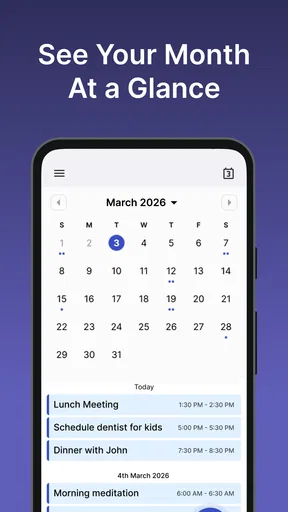
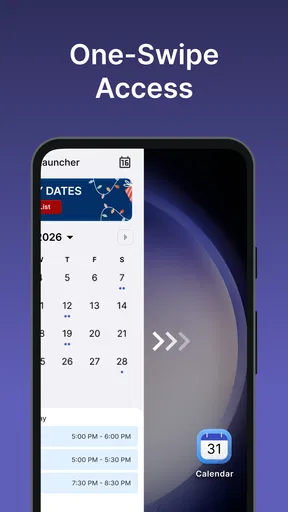
The practical appeal of a calendar launcher is that it puts schedule information close to the place where I already start using my phone: the home screen. Rather than treating planning as a separate task that requires opening a complicated organizer, I can use a calendar view to orient myself, then decide what needs attention. For someone who checks the phone between errands or meetings, that small reduction in friction can matter more than a long list of advanced tools.
Its name points to a calendar built around the 2026 planning year, but I would think of it primarily as a day-to-day organizer rather than a solution for every kind of project management. The useful question is whether seeing dates, appointments, and reminders in one routine helps you act on them. If your main problem is forgetting when something happens, a clear calendar habit may help; if you need to divide complex work into tasks, owners, and dependencies, a dedicated task or team-planning tool is likely a better fit.
A calendar workflow that starts at home
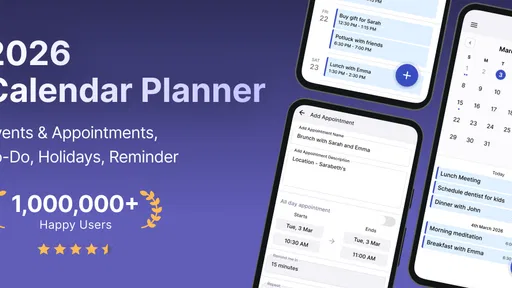
First off, let me say that the 2026 Calendar Launcher has a super clean interface. It’s not cluttered with unnecessary bells and whistles, which I totally appreciate. You know how some apps feel like they’re trying to do too much at once? Not this one. It keeps things simple yet effective, and I’m all about that.
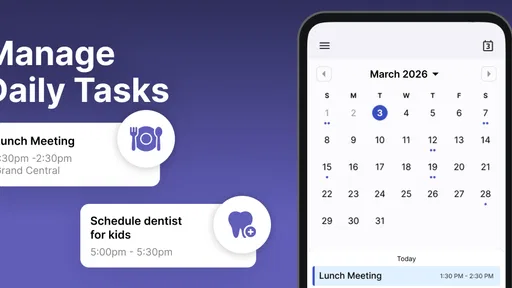
The moment you open the app, you’re greeted with a sleek dashboard that presents your schedule in a visually pleasing manner. It’s like having a personal assistant who lays everything out for you at a glance. No more scrolling endlessly through tiny text.
Make the screen serve your routine
One of the standout features is its customization options. You can color-code your events, set specific reminders, and even add widgets to your home screen. Trust me, being able to see your day’s agenda with just a quick peek is a game-changer. Plus, if you’re anything like me and love a bit of personalization, you’ll adore the themes available. There’s something for everyone, whether you want a minimalist look or something more vibrant.
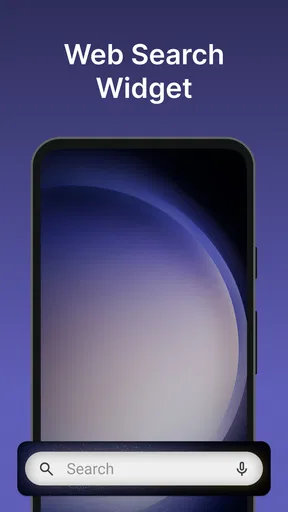
There is a useful trade-off here: a widget makes a schedule easier to glance at, but a busy calendar can also make the home screen feel crowded. I’d start with the smallest amount of information that helps me make a decision—what is next, or what is coming up today—rather than trying to display everything at once. Color coding works best when each color has a stable meaning, such as work, family, or personal appointments. If every event gets its own color, the visual system stops helping.
Worth Reading Before You Choose

EA SPORTS FC Mobile 26 Is a Bigger Football Game, but It Takes Time

Flipboard Shows What News Apps Must Do Beyond the Feed

Switching to Android Auto Means Rethinking Your Driving Routine

Google Calendar Makes a Crowded Week Easier to Manage

Ludo King Makes the Most of the Minutes Between Plans

Baby Panda World Brings Quick Play to Modern Phones, but Its Game Library Feels Busy
This setup is particularly handy for someone whose day is chopped into short gaps. A parent checking pickup times, a student balancing classes and appointments, or a freelancer moving between client calls may benefit from seeing the next commitment without opening several screens. It is less compelling for someone who rarely checks a home screen or prefers to keep all schedule details inside a single, full-screen calendar view.
Move an event from incoming to scheduled
Now, here’s where it gets really exciting. The app integrates seamlessly with other platforms, like Google Calendar and Apple’s iCal. This means you won’t have to manually enter events across different apps—everything syncs effortlessly. It’s like magic, really. I can’t tell you how much time I’ve saved by not having to duplicate entries across my devices.
That handoff is most valuable when another calendar is already part of your routine. If work commitments live in one place and personal plans in another, a connected view can reduce the chance of overlooking a conflict. I would still treat the calendar you rely on most as the source of truth: after adding or changing an important event, check that it appears where you expect before assuming every device or account has caught up. Syncing is convenient, but it does not remove the need to notice whether an entry landed in the right calendar.
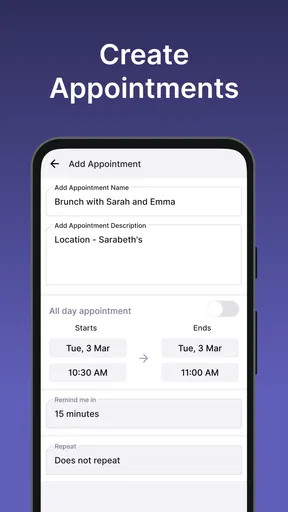
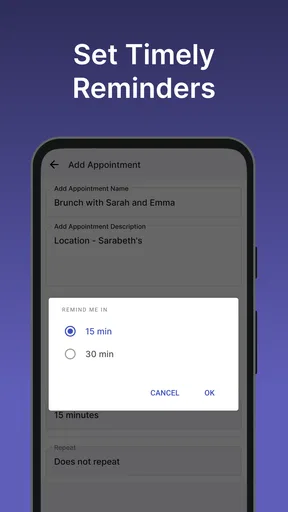
A practical workflow is to capture the appointment when it comes in, make sure its date and time are right, then use a reminder that leaves enough time to act. For a routine commitment, recurrence can reduce repeated entry; for a one-off appointment, a reminder should reflect the real next step, such as leaving home or preparing a document. This distinction keeps reminders useful instead of turning them into background noise.
Keep recurring commitments from becoming clutter
Let’s talk about event management. Creating events is a breeze, and you can invite others just as easily. It even lets you set recurring events, which is perfect for those weekly meetings or regular gym sessions. The app sends timely reminders, so you’re never caught off guard by a sudden deadline or appointment.
Recurring entries deserve a little care. A weekly class or standing meeting is a good candidate because the pattern is predictable; a schedule that changes often can become misleading if the repeated event is not adjusted. I would review recurring commitments whenever a season or routine changes, and remove or edit them promptly when they stop applying. Otherwise, a calendar intended to clarify the week can gradually fill with outdated obligations.
Inviting other people also changes the job the calendar is doing: it becomes part of a handoff, not just a private note. Before relying on an invitation, make sure the details are clear enough for everyone involved, especially the time and the expected attendance. For shared planning that needs discussion, task assignments, or detailed project tracking, a group-focused service may handle the coordination better. This app is more naturally suited to putting the appointment on the schedule than managing all the work around it.
When the connection drops
"It’s like having a personal assistant who lays everything out for you at a glance."
One feature that I find incredibly useful is the offline access. No Wi-Fi? No problem. You can still check your schedule and make changes, and it’ll sync up once you’re back online. This is a lifesaver for those moments when you’re off the grid but still need to keep tabs on your life.
For travel or a weak signal, being able to refer to a schedule can keep the day moving. I would make any essential changes before going offline when possible, then check that they have synced after reconnecting—particularly if another person is depending on the update. Offline access helps with continuity, but it is not a substitute for confirming a change has reached the calendar other people see.
This also points to a useful choice between a simple personal schedule and a shared planning system. If you mostly need to remember where to be, offline viewing and later syncing can be enough. If your plans change rapidly and several people need immediate confirmation, a tool designed around live team coordination may be safer for that particular workflow.
Choose the right level of trust
In this day and age, privacy is a big deal. The app assures users of its commitment to data security, and I haven’t encountered any issues. Knowing that my information is safe gives me peace of mind, which is priceless.
For sensitive appointments, I would still be thoughtful about what I put in any calendar. A short label can be enough to remind me where I need to be without recording unnecessary personal detail. That is a useful habit regardless of which organizer I use: calendars are convenient because information is easy to find, so I should only include what I genuinely need for planning.
There are a few questions worth settling before making it the center of a routine. If you already use Google Calendar or Apple’s iCal, its integration may make it easier to see plans without entering them twice. If you prefer to keep separate calendars isolated, check that the way events appear matches how you want to divide work and personal life. If you need offline access, it can help you consult and edit your schedule away from a connection, with the sensible follow-up of checking the sync later. And if you want a full task manager, shared project board, or detailed work tracker, a calendar alone is not the right replacement.
Compared with a basic built-in calendar, the draw here is the launcher-style emphasis on quick visibility, alongside customization and reminders. Compared with a full productivity suite, the appeal is a more focused calendar experience rather than a broader system for notes, tasks, and collaboration. The best choice depends on the point where your planning currently fails: if you forget dates because they are buried, visibility may help; if you forget to complete the work itself, you may need task tracking as well.
Who is likely to get the most from it?
I’d recommend trying it if you want a straightforward way to keep appointments in view, use reminders for real commitments, and bring calendar information closer to your home-screen routine. The app is free, and its current version is 2.14.0, with Android 10 as the minimum operating system. It was released on April 5, 2024, and around 1,900 written reviews add context to the broader rating picture. Those details make it easier to judge whether it fits your device and whether you want to give its approach a try.
I would skip it as my main planning tool if my work depends on detailed task dependencies, extensive project notes, or constant coordination across a large group. I would also avoid relying on any calendar without checking that a newly added or edited event has reached the account and device where I need it. Those are not reasons a calendar launcher is inherently poor; they are boundaries between a convenient appointment organizer and a more specialized system.
And there you have it. The 2026 Calendar Launcher is more than just a digital calendar. It’s a comprehensive tool designed to make your life easier. From its seamless integrations to its user-friendly design, it’s clear that a lot of thought has gone into making this app a standout choice for anyone looking to streamline their scheduling needs. If you’re looking for one app to rule them all, this might just be it.
The result: fewer missed transitions
The strongest case for this app is not that it can organize every part of life, but that it can make the transition from hearing about a commitment to seeing it on the day easier. Imagine a weekday when a work call is followed by an appointment and then a regular evening class. I can add each commitment as it arrives, use a reminder for the one that needs preparation, and glance at the day before leaving. If the schedule changes while I am offline, I can make a note and verify the update after reconnecting. That is a modest workflow, but it addresses the ordinary places where plans slip.
My overall recommendation is to try it if a visible, customizable calendar is what you are missing, and to judge it by whether you actually check the schedule more consistently. Keep colors purposeful, review repeating events when routines change, and confirm important synced edits. Those small habits bring out the app’s practical strengths without expecting it to replace a task manager or a team coordination service.
Pros
- Intuitive and user-friendly interface.
- Customizable calendar views.
- Seamless integration with reminders.
- Offline access to calendar events.
- Minimal battery consumption.
Cons
- Limited theme options available.
- No integration with third-party apps.
- Ads present in the free version.
- Requires frequent updates.
- Lacks advanced scheduling features.
FAQs for 2026 Calendar Launcher
What features does the 2026 Calendar Launcher offer?
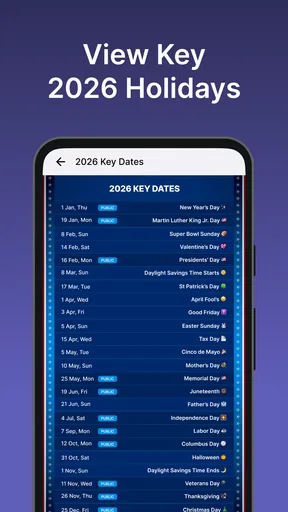
The 2026 Calendar Launcher offers a sleek and intuitive interface designed for easy navigation. Key features include customizable reminders, event color coding, integration with other calendar apps, and a widget for quick access. Additionally, it provides holiday and moon phase tracking, ensuring users never miss crucial dates.
Is the 2026 Calendar Launcher compatible with other apps?
Yes, the 2026 Calendar Launcher is designed to integrate seamlessly with other popular calendar apps like Google Calendar and Outlook. This ensures that all your events and reminders are synchronized across platforms, providing a cohesive and organized scheduling experience.
How user-friendly is the 2026 Calendar Launcher for new users?
The 2026 Calendar Launcher is highly user-friendly, featuring an intuitive design that makes navigation straightforward for users of all levels. The app offers a simple setup guide for new users, and its clean layout ensures that adding and managing events is a breeze, without overwhelming features.
Are there any costs associated with using the 2026 Calendar Launcher?
The 2026 Calendar Launcher is available as a free app with basic features. However, there are in-app purchases available for users who wish to access premium features, such as advanced customization options and ad-free experience. This allows users to tailor the app to their specific needs.
What are the privacy considerations with the 2026 Calendar Launcher?
The 2026 Calendar Launcher prioritizes user privacy, ensuring that all personal data is encrypted and stored securely. It requires minimal permissions, and users have full control over what data is shared. The app’s privacy policy is transparent, detailing how information is used and protected.


